
How to Log In to a Facebook Account Without Password in 2026
Learn how to log in to a Facebook account without password in 2026 safely. Step-by-step methods to regain access quickly and securely.
Stressed because you can’t access Facebook after forgetting your password? Or just tired of entering it every day? You’re not alone. In this article, 2ui will show you how to log in to a Facebook account without password in 2026—safely and quickly, with simple methods to help you regain access with ease.
1. How to log in to a Facebook account without password?
When you can’t log in to Facebook, don’t panic! You can recover your account immediately using several proven methods. Follow the steps below depending on your situation.
Method 1: Use "Find Your Account" (via WhatsApp, Email, or SMS)
If you’ve forgotten your password, the fastest way to recover your account is to find it using your linked phone or email:
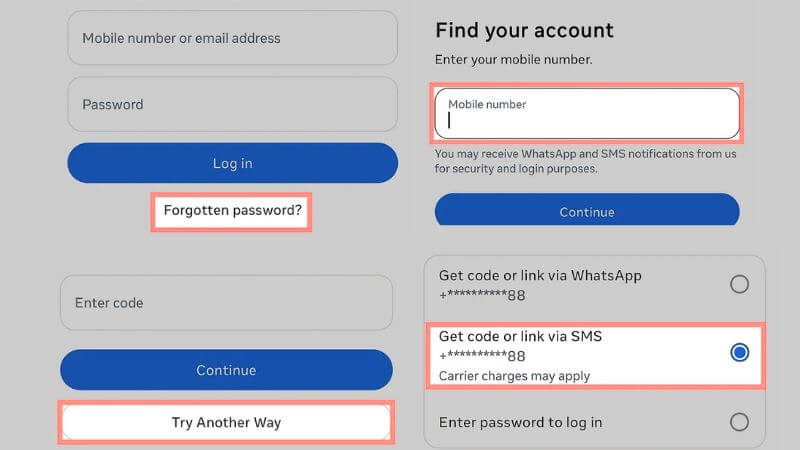
- Go to facebook.com/login/identify.
- Enter your phone number or email associated with your account.
- Choose how to receive your OTP code. We strongly recommend selecting WhatsApp if your account is linked, as it is faster and avoids delays or errors that can occur with SMS.
Method 2: Log In via Meta Accounts Center (Using Instagram)
Meta’s hidden weapon lets you log in without a password if your Instagram is linked.
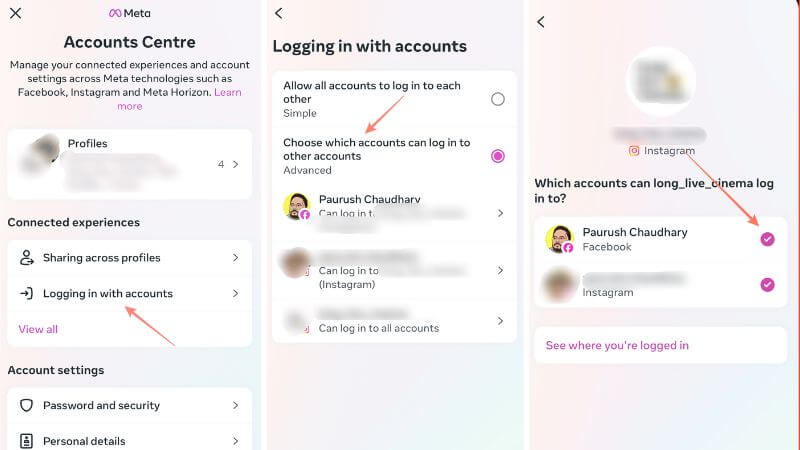
- Open your Instagram app where you’re logged in.
- Go to Settings > Meta Accounts Center.
- Select Logging in with accounts and choose your Facebook account to log in directly without a password.
Method 3: Access via a Recognized Device or Browser
If you still have a device or browser where you previously logged into Facebook, it can help you regain access. Facebook often saves login sessions, so try your old laptop, tablet, or phone. Simply open Facebook on that device—sometimes it will let you log in without asking for a password.
This method is quick, especially if you no longer have access to your email or phone. It’s worth checking every device you’ve used for Facebook.
Method 4: Account Hacked & Lost Contact Info? The Final Solution
If all else fails and your account is hacked with no access to email or phone, follow these steps to recover it quickly:
- Go to facebook.com/hacked and follow the on-screen instructions to recover your account.
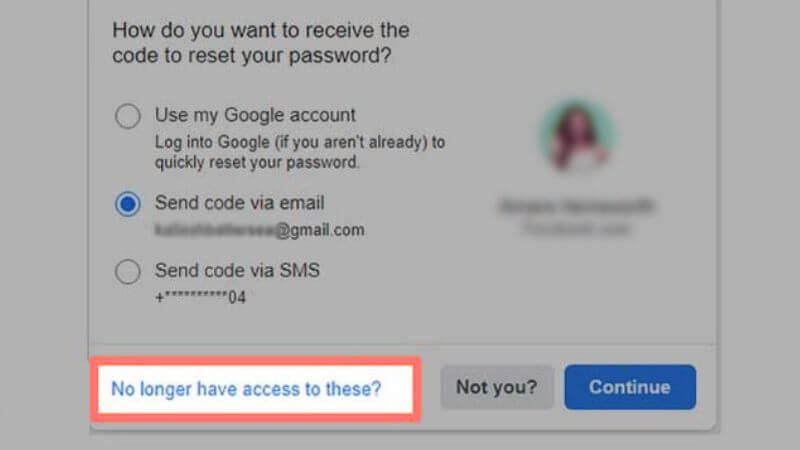
- On the “Forgot Password” page, click “No longer have access to these?” and upload a government-issued ID (like CCCD or Passport) to verify your identity.
2. Set Up Passwordless Login for Future Convenience
If you’ve regained access to your account, set up these features immediately to never have to remember your password again. Passwordless login not only saves time but also improves security when used correctly.
Method 1: Set Up Facebook Passkeys (Face ID, Touch ID, or PIN)
Passkeys let you log in using your fingerprint, face, or a PIN instead of a traditional password. This is one of the safest and most convenient ways to access your Facebook account.
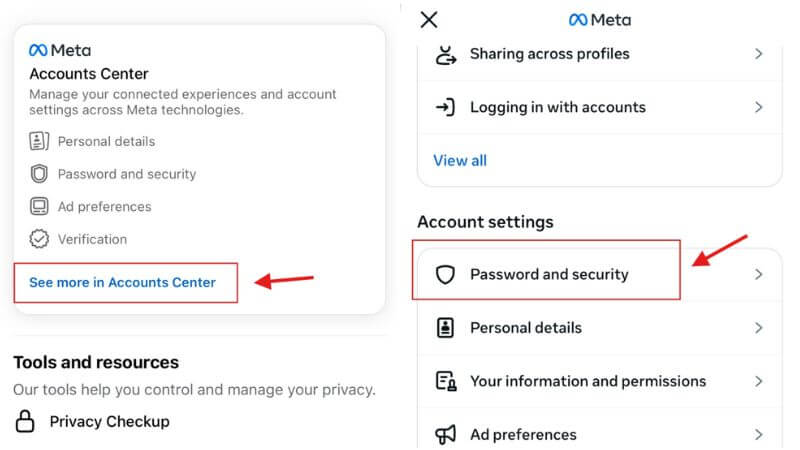
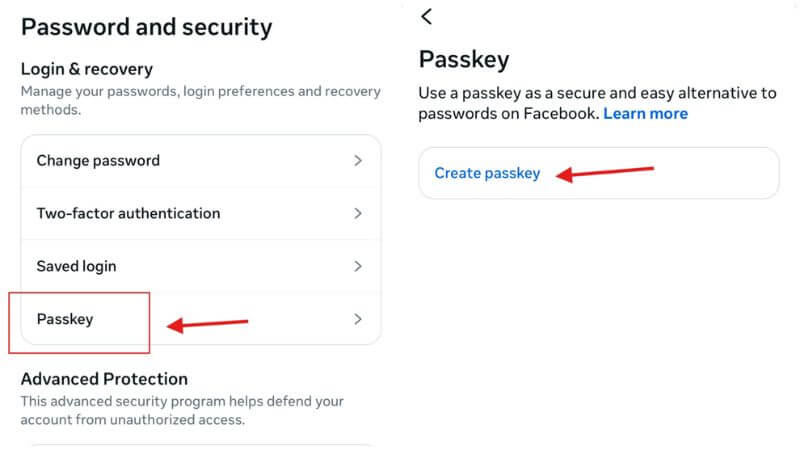
- Open the Facebook app and go to Settings > Password and Security.
- Tap Passkeys, then select Create a Passkey.
- Follow the on-screen instructions to register your Face ID, Touch ID, or PIN.
- Once set, you can log in quickly and securely without typing a password each time.
Tip: Make sure your device supports biometric login for the smoothest experience.
Method 2: Enable "Tap to Log In" (Saved Login Info)
Facebook’s Tap to Log In feature saves your login info on your device, letting you access your account instantly. Once enabled, you just tap your profile picture at the login screen to enter your account—no password needed.
- Go to Settings > Password and Security > Saved Login Info.
- Toggle Saved Login Info to On.
- Confirm your device and account to activate Tap to Log In.
- Next time you open Facebook, simply tap your profile picture to log in immediately.
3. Crucial Security Tips for Passwordless Users
Using passwordless login makes accessing Facebook easier, but it also requires extra care to keep your account secure. Follow these essential tips to protect your account and prevent unauthorized access:
- Do not use Tap to Log in on public devices: Avoid logging in on shared or public computers to prevent unauthorized access.
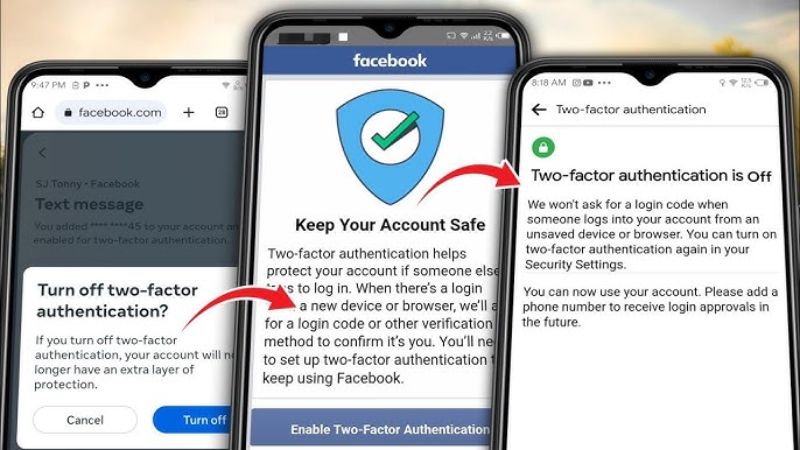
- Enable Two-Factor Authentication (2FA): Always add a second layer of security to your account to protect it even if someone tries to bypass your passwordless login.
- Protect your Email/iCloud account: Since Passkeys are synced via iCloud or Google accounts, losing access to your email means losing access to all linked passwordless logins.
By following these steps, you can enjoy the convenience of passwordless login while keeping your Facebook account safe and fully under your control.
4. Frequently Asked Questions (FAQs)
Can I recover my Facebook without an email or phone number?
Yes, you can log in to a Facebook account without password even without email or phone. Use Meta Accounts Center if your Instagram is linked, check recognized devices, or submit a government-issued ID to Facebook support to verify your identity.
What happens to my Passkey if I lose my phone?
Passkeys are safely synced to your cloud account (like Apple iCloud Keychain or Google Password Manager). If you get a new phone, log into your cloud account, and your Facebook Passkey will be restored automatically, allowing you to log in without a password.
With the methods above, you now know how to log in to a Facebook account without password safely and quickly in 2026. Whether you forgot your password or want easier access, you can follow these steps to get back into Facebook hassle-free. Try them now and keep your account always ready to use! Follow the 2ui' blog for more tips, tools, and strategies in digital marketing to grow your business online.