
How to Deactivate Instagram Account (Quick & Easy Guide)
Learn how to deactivate Instagram account quickly and safely. Follow this easy guide to hide your profile and take a break without losing data.
Want to take a break from social media without losing your photos, followers, or messages? You can deactivate your Instagram account in just a few minutes—no need to delete it permanently. In this article, 2ui will show you exactly how to deactivate instagram account step by step on both mobile and desktop, along with what happens afterward and how to fix common issues.
What Happens When You Deactivate Your Instagram Account?
When you deactivate your Instagram account, your profile, photos, videos, comments, and likes are hidden, and other users can’t find you. However, your data is not deleted — your direct messages still exist, and your account information and followers list are secure and fully preserved.
You can keep your account deactivated for as long as you want, with no time limit. Whenever you’re ready to return, simply log back in to restore everything. Think of deactivation as a temporary “pause” rather than a permanent action.
How to Deactivate Instagram Account (Step-by-Step)
There are two main ways to deactivate your account. The easiest method is using a browser.
Method 1: Using a Mobile Browser (Recommended)
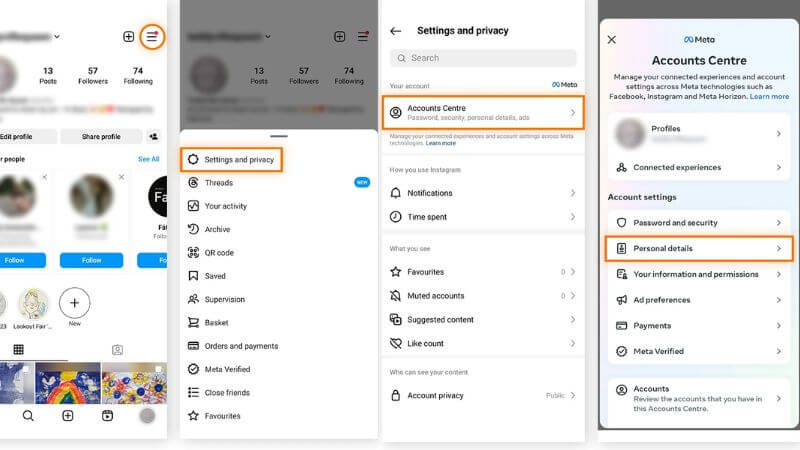
If you're wondering how to deactivate Instagram account using a mobile browser, this method is the most reliable since the option isn’t fully available inside the app.
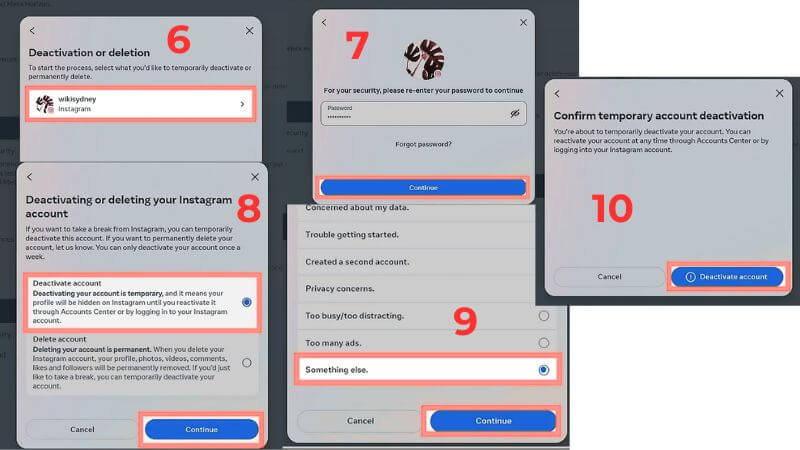
Follow these steps:
- Open your Instagram
- Tap Setting and privacy
- Tap Account Centre → Go to Personal details
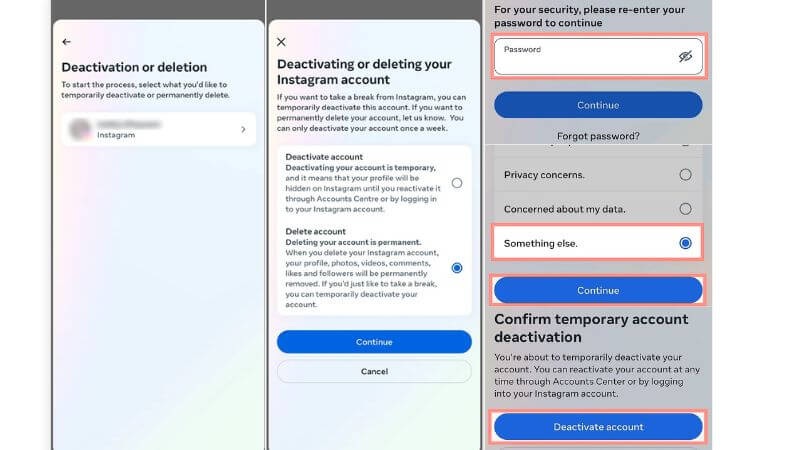
- Tap Your Instagram Account
- Scroll down and tap “Deactiving your account is temporarily ”
- Choose a reason from the dropdown menu
- Enter your password
- Tap Disable Account to confirm
Method 2: Using Desktop (PC or Mac)
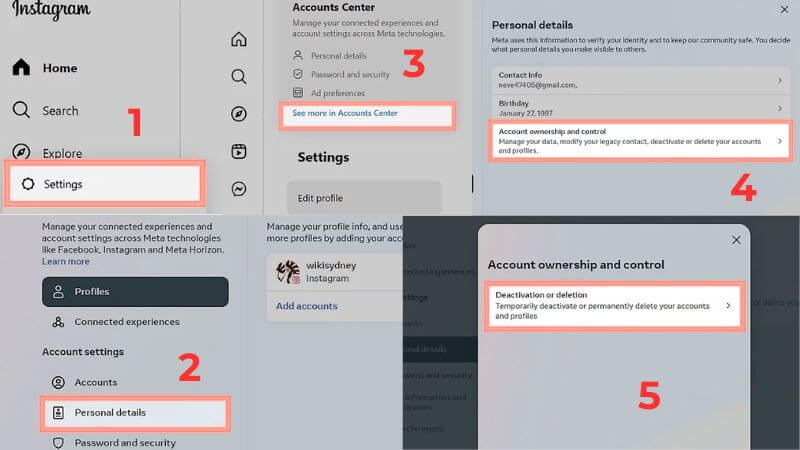
If you prefer using a computer, understanding how to deactivate Instagram account on desktop is just as simple and gives you a clearer view of settings:
- Open a browser on your computer
- Go to Instagram and log in
- Tap Setting
- Tap Account Centre → Go to Personal details
- Tap Your Instagram Account
- Scroll down and tap “Deactiving your account is temporarily ”
- Choose a reason from the dropdown menu
- Enter your password
- Tap Disable Account to confirm
How to Reactivate Your Instagram Account
If you’ve previously deactivated your account, reactivating it is quick and straightforward. You can restore your profile and all data in just a few simple steps:
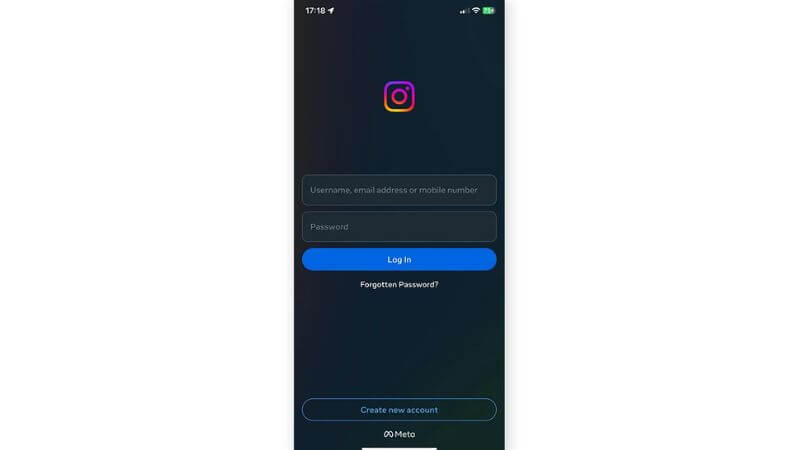
- Open the Instagram app or go to the Instagram website.
- Log in using your username and password.
Once you log in successfully, your profile, posts, and followers will be restored instantly, allowing you to continue using your account as before.
Important Things to Know Before Deactivating
Before you proceed, keep these points in mind:
- You can only deactivate your account once per week
- You must remember your login credentials
- Your data is not deleted
- You won’t receive notifications while deactivated
These rules help prevent misuse and protect your account.

Can’t Deactivate Your Instagram Account? Here’s How to Fix It
If you’re having trouble, here are common issues and solutions:
Problem: “Temporarily disable account” option not showing
Solution:
- Use a browser instead of the app
- Try switching to desktop mode
Problem: Can’t log in
Solution:
- Reset your password
- Check your email or phone for verification
Problem: Page not loading or error
Solution:
- Try a different browser
- Clear cache and cookies
- Use another device
FAQs About Deactivating Instagram
Can people still find my account when deactivated?
No. Your profile is completely hidden and cannot be searched.
Will I lose followers or data?
No. Everything is secure and restored when you reactivate.
Can I deactivate multiple times?
Yes, but only once per week.
Is deactivation reversible?
Yes. Just log back in anytime to restore your account.
Now you know how to deactivate Instagram account quickly and safely without losing your data. This simple process allows you to hide your profile, take a break from social media, and return anytime you’re ready. If you’re feeling overwhelmed, there’s no need to delete your account permanently. Just deactivate it, take control of your time online, and come back whenever it suits you. Follow the 2ui's blog for more tips, tools, and strategies in digital marketing to grow your business online.