
How to Hide Your Likes on Instagram in 2026
Learn how to hide your likes on Instagram in 2026. Follow simple steps to control privacy, reduce pressure, and enjoy a cleaner.
Feeling pressured by the number of likes on your posts? Want a cleaner, less distracting Instagram experience? You’re not alone—more users are taking control of how they use social media. In this article, 2ui will show you exactly how to hide your likes on Instagram in 2026 with just a few simple taps—quick, easy, and effective.
How to Hide Your Likes on Instagram Feed?
Follow these simple steps to learn how to hide likes on Instagram Feed and hide like counts on posts from others while browsing your Instagram feed:
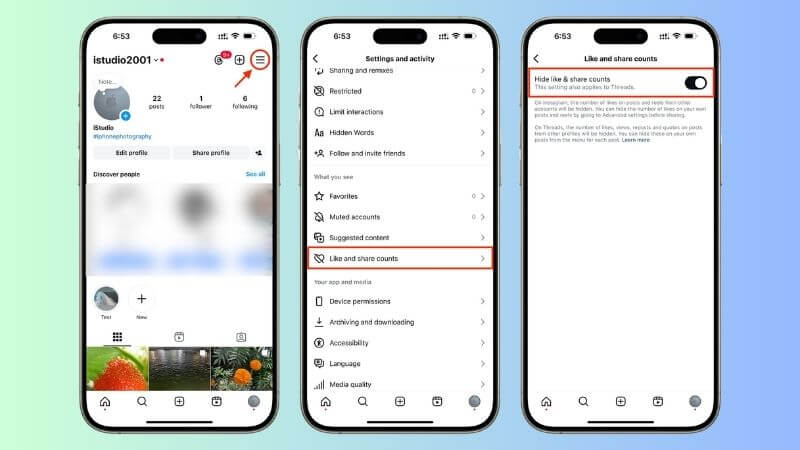
Step 1: Go to your profile
Open Instagram and tap your profile picture at the bottom right corner.
Step 2: Tap the menu icon
Tap the three-line (☰) menu in the top right corner, then select Settings and activity.
Step 3: Turn on “Hide like and view counts”
Toggle on the Hide like and view counts option. Once enabled, you won’t see like counts on posts in your feed anymore.
How to Hide Your Likes on Instagram Posts & Reels?
Hiding like counts on your own posts or Reels gives you more control over how your content is perceived. Whether you’re posting new content or managing existing posts, Instagram allows you to easily hide likes in just a few steps.
Hide likes before publishing a new post
If you’re looking for more privacy and control over engagement, how to hide your likes on Instagram is a simple feature that lets you manage how others see interactions on your posts.
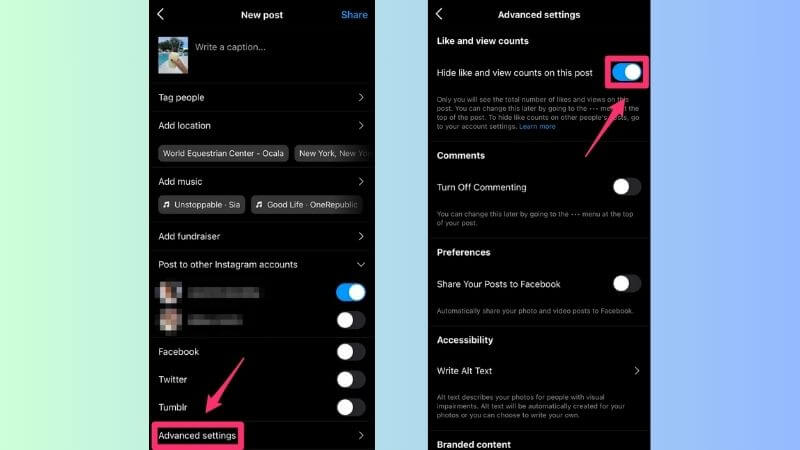
Step 1: Create a new post or Reel
Tap the “+” (Create) button and choose Post or Reel as usual.
Step 2: Go to Advanced Settings
On the final screen before posting, scroll down and tap Advanced settings at the bottom.
Step 3: Enable hide like counts
Toggle on Hide like and view counts on this post.
Step 4: Share your post
Go back and tap Share. Your post will be published without showing like counts to others.
Hide likes on an existing post or Reel
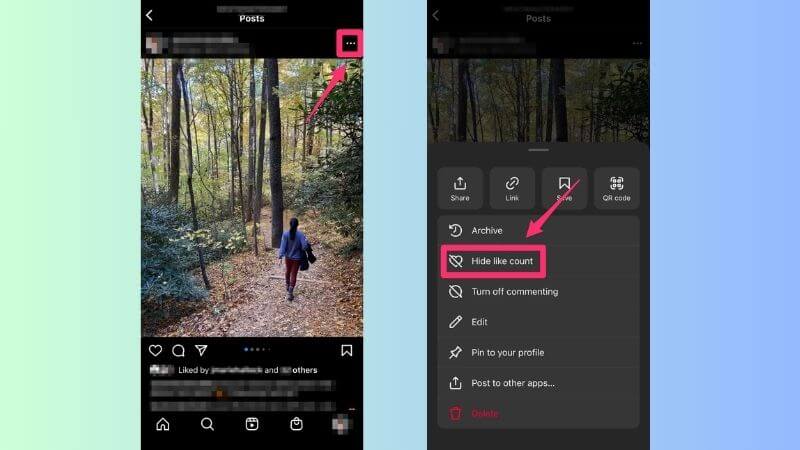
If you’re exploring how to hide your likes on Instagram, the good news is that even after publishing a post or Reel, you can still hide the like count anytime with just a few quick steps:
Step 1: Open the post or Reel you want to edit.
Step 2: Tap the three-dot (⋯) icon in the top right corner.
Step 3: Select Hide like count.
Why You Should Hide Your Like Count?
If you’re considering hiding your like count, you’re making a smart move toward a healthier and more enjoyable Instagram experience.
- Less Social Pressure: Hiding likes helps reduce the urge to compare yourself with others, making you feel more confident and less stressed about numbers.
- Focus on Quality Content: Without visible like counts, viewers pay more attention to your photos and videos instead of judging popularity.
- Creative Freedom: You can post what you truly enjoy without worrying about low engagement or “flop” posts, encouraging more authentic content.

Frequently Asked Questions (FAQs)
Does hiding likes hurt the Instagram algorithm or my reach?
No. Hiding likes does not affect the Instagram algorithm or your reach. Instagram still tracks likes in the backend to understand engagement and distribute your content to feeds and the Explore page. The only change is on the user interface—others won’t see the total like count, but your post performance remains the same.
Can my followers still see who liked my post?
Yes. Even if you hide the total number of likes, people can still see who interacted with your post. The interface will show “Liked by [username] and others.” If someone taps on “others,” they can view the full list of users who liked the post.
How do I unhide likes if I change my mind?
Yes. You can easily unhide likes at any time. Simply repeat the same steps and tap the three-dot menu on your post, then select “Unhide like count.”
Can I hide likes using Instagram Web (Desktop)?
Yes. The feature is available on Instagram Web, but it depends on your account version. In most cases, settings synced from the mobile app will apply automatically to the desktop version.
Now that you know how to hide your likes on Instagram, you can take full control of your social media experience and focus on what truly matters. This simple 2026 update helps reduce pressure and create a cleaner feed. Try it today to enjoy Instagram your way. Follow the 2ui's blog for more tips, tools, and strategies in digital marketing to grow your business online.