
How to Remove TikTok Logo from Video iPhone
Learn how to remove TikTok logo from video iPhone with easy methods. Clean your videos and repost without watermark in just a few steps.
Want to repost your TikTok videos on iPhone without the distracting watermark? You’re not alone—many users want their content to look clean and professional. In this article, 2ui will show you how to remove TikTok logo from video iPhone with quick and easy methods, so you can reuse your content seamlessly.
Why You Should Remove TikTok Watermarks Before Reposting?
If you plan to reuse your TikTok videos on other platforms, removing the watermark is a smart move to improve reach and overall quality.
- Platform Algorithms (Instagram Reels, YouTube Shorts): Platforms like Instagram Reels and YouTube Shorts tend to limit the reach of videos with visible TikTok watermarks. Removing it helps your content perform better and increases the chances of getting more views.
- Professional Visual Aesthetics: A clean, watermark-free video looks more polished and credible. It keeps viewers focused on your content instead of distracting logos, making your videos feel more professional and brand-friendly.
How to Remove TikTok Logo from Video iPhone?
If you’re searching for how to remove TikTok logo from video iPhone, there are several quick and easy methods to do it without needing advanced editing skills. One of the fastest options is using online tools directly from your browser.
Method 1: The Fast & Free Way (No App Required)
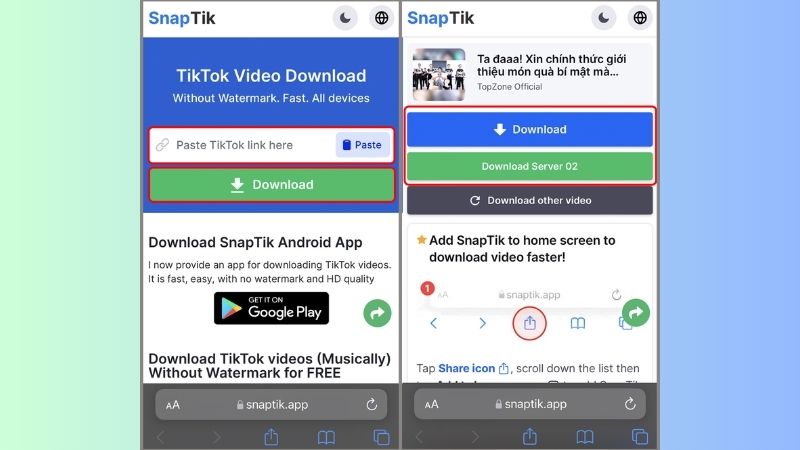
Using SnapTik/SSSTik on Safari is the quickest way to remove the TikTok watermark directly on your iPhone without installing any apps.
- Copy the TikTok video link you want to download.
- Open Safari and visit SnapTik or SSSTik.
- Paste the link into the input box.
- Tap Download (No Watermark) and save the video.
Method 2: The "Native" iPhone Hacks (No Data Required)
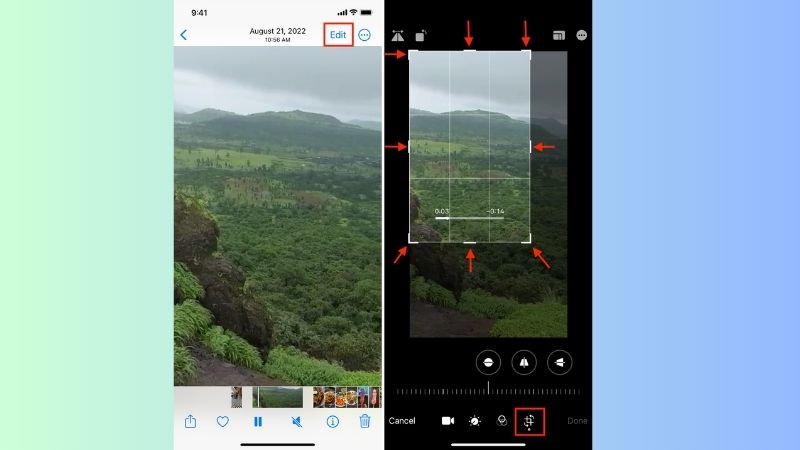
Using the Crop Tool in Photos App If you already saved the video, you can remove the watermark using built-in tools—no internet required.
- Open the video in the Photos app.
- Tap Edit → Select the Crop tool.
- Adjust the frame to cut out the watermark area.
- Tap Done to save your edited video.
Method 3: The 1-Tap Solution (iOS Shortcuts)
Using iOS Shortcuts allows you to download TikTok videos without watermark in just one tap.
How to Set Up "TikTok Downloader" Shortcut
- Install the Shortcuts app (pre-installed on iPhone).
- Add a trusted TikTok Downloader shortcut from a reliable source.
- Open TikTok → Tap Share → Select More → Choose the shortcut.
- The video will automatically download without watermark.
Why Shortcuts are Safer than Third-Party Apps
- No need to install unknown apps
- Better privacy (runs locally on your device)
- Faster and more convenient for repeated use
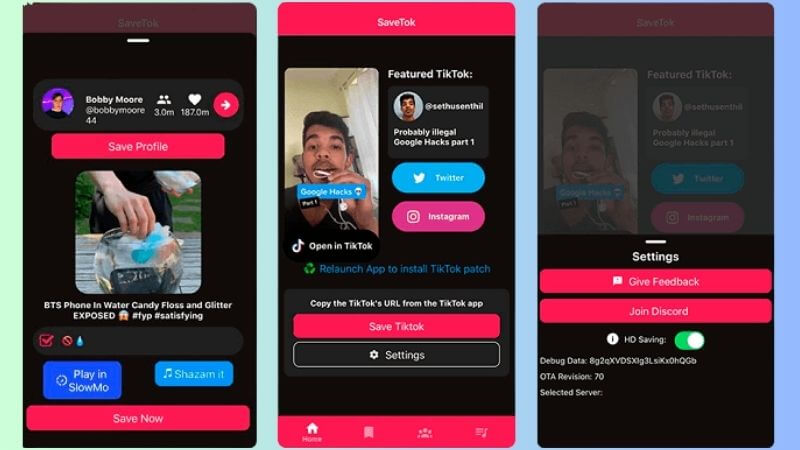
Method 4: Top-Rated Third-Party Apps (For Power Users)
If you frequently download videos, third-party apps can offer more advanced features like batch downloads.
- SaveTok: Easy-to-use interface, supports bulk downloads
- TikSaver: Fast processing, good for managing multiple videos
How to Remove the TikTok "End Screen" Credits?
You can easily remove the TikTok end screen (credits) using basic editing tools like CapCut or your iPhone’s built-in trim feature.
- Using CapCut: Import your video → Drag the timeline to the end → Select and delete the last few seconds where the TikTok credits appear → Export the video.
- Using iPhone Trim (Photos app): Open the video → Tap Edit → Drag the end slider to cut off the credits → Tap Done to save.
Why is My Video Quality Dropping?
Video quality often drops due to compression during editing or uploading.
- Compression issues: Apps like TikTok or CapCut may reduce resolution or bitrate when exporting or uploading, causing blurry visuals.
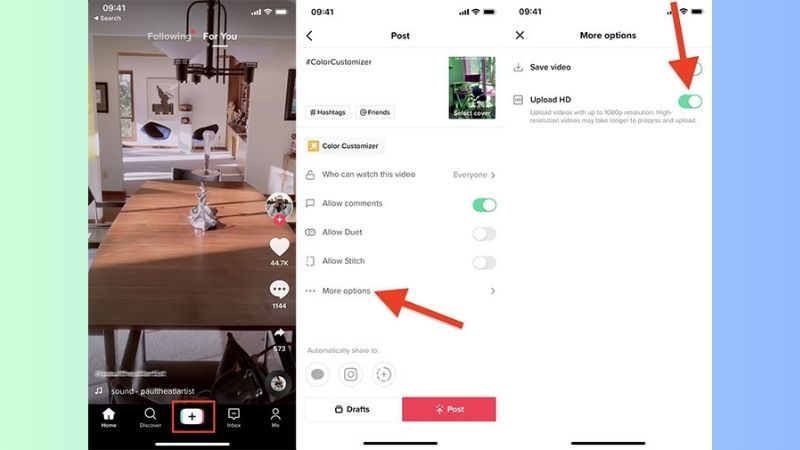
- How to maintain 1080p quality: Export your video in 1080p (Full HD) with high bitrate settings > Turn on “Upload HD” in TikTok settings > Avoid re-downloading videos multiple times, as each export reduces quality.
Frequently Asked Questions (FAQs)
Is it legal to remove TikTok watermarks?
Yes, but… it depends on usage. Removing watermarks is generally allowed for personal use, but reposting without credit or violating copyright may break TikTok’s policies.
Can I remove logos from private videos?
Yes. You can remove logos from your own private videos easily, as long as you have access to the original file or download
Now you know how to remove TikTok logo from video iPhone quickly and effectively. Use these simple methods to create clean, professional videos and boost your content across multiple platforms. Regularly visit 2uid’s blog for more internet tech tips, tricks, and news!