
How to Make AI Videos for TikTok That Go Viral
Learn how to make AI videos for TikTok that go viral. Create faceless content fast with simple tools and proven steps for growth in 2026.
Want to grow on TikTok but don’t want to show your face or edit videos? You’re not alone—many creators struggle with this. In 2026, AI can do most of the work. This guide on how to make AI Videos for TikTok shows you a simple A–Z process to create faceless videos that can go viral. In this article, 2ui will guide you through a simple A–Z process to create faceless TikTok videos using AI—helping you boost your chances of going viral.
Step-by-Step: How to Make AI Videos for TikTok
Creating a viral faceless AI video is easier than ever in 2026. If you’re learning how to make AI videos for TikTok, the right workflow can take you from idea to a finished TikTok in under an hour—without filming yourself. Follow these 4 practical steps below to build content that grabs attention and keeps viewers watching.
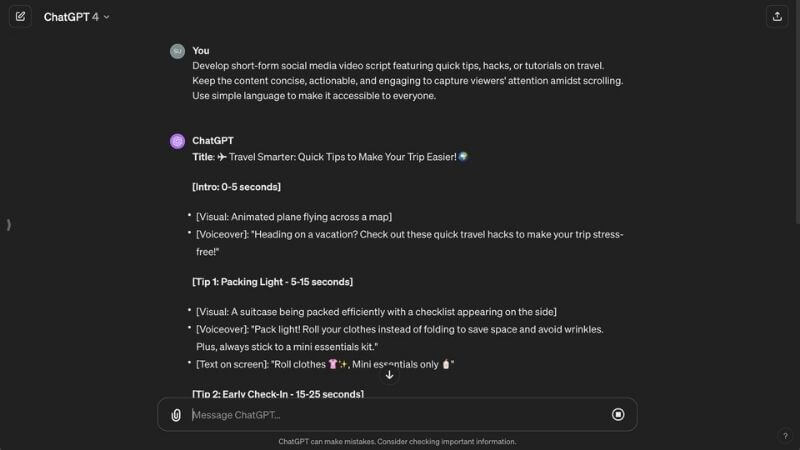
Step 1: Write a Hook-Driven Script using ChatGPT or Claude
The script is the foundation of your video. On TikTok, the first 3 seconds (hook) decide whether viewers stay or scroll. That’s why your opening line must be attention-grabbing, emotional, or curiosity-driven.
Use AI tools like ChatGPT or Claude to generate scripts quickly. Focus on short, punchy sentences and structure your content clearly (Hook → Value → CTA).
Prompt (Copy & Paste):
Act as a TikTok expert. Write a 45-second script about [Your Topic]. Make the first 3 seconds a strong hook to stop scrolling. Structure the script into 2 columns: Visual (what happens on screen) and Audio (voiceover script). Keep it engaging and simple.
Step 2: Generate a Trending Voiceover (ElevenLabs / CapCut TTS)
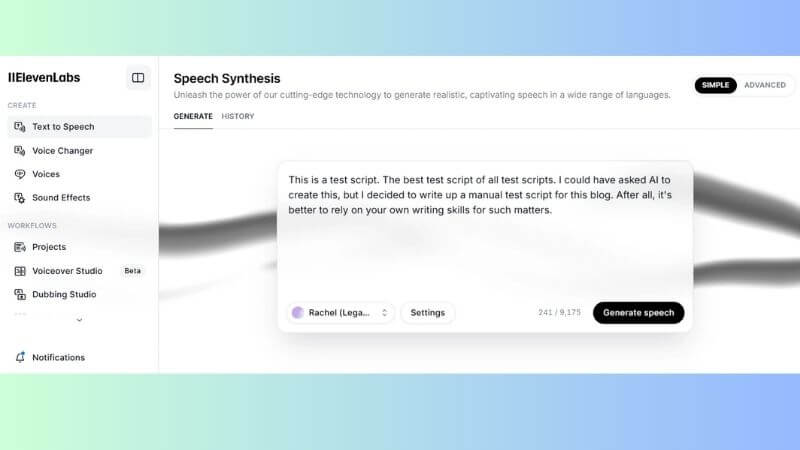
Once you have your script, turn it into a voiceover using AI. A good voice can significantly boost watch time and engagement.
- Copy your script
- Paste it into ElevenLabs or CapCut Text-to-Speech
- Choose a natural, emotional or energetic voice
- Click Generate and download the MP3 file
Step 3: Create Visuals & Avatars (Midjourney / HeyGen / Sora)
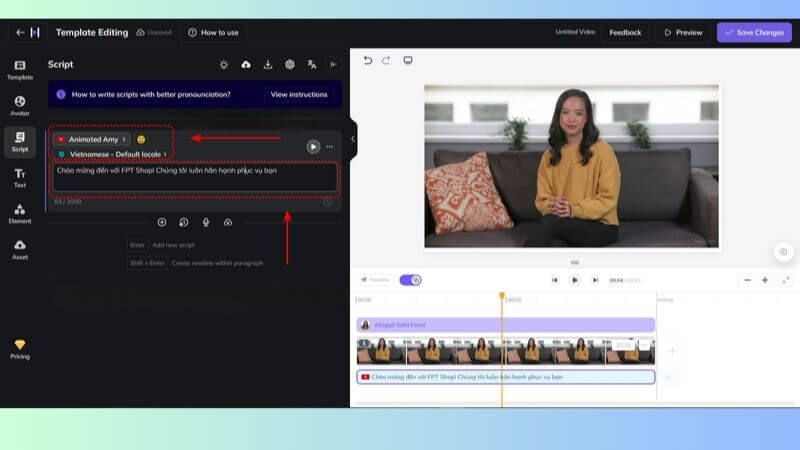
Now it’s time to bring your script to life visually. You have two main directions depending on your content style:
- Option 1: B-roll / AI visuals
Use Midjourney to generate images or Sora to create short video clips that match your script. This works well for storytelling, facts, or educational content. - Option 2: AI Avatar (Virtual Host)
Use HeyGen to create a realistic AI avatar that speaks your script. This adds a “human touch” without showing your real face.
Visual suggestion: GIF of a HeyGen avatar speaking or a 9:16 AI-generated image from Midjourney.
Step 4: Edit and Add Auto-Captions in CapCut (9:16 Format)
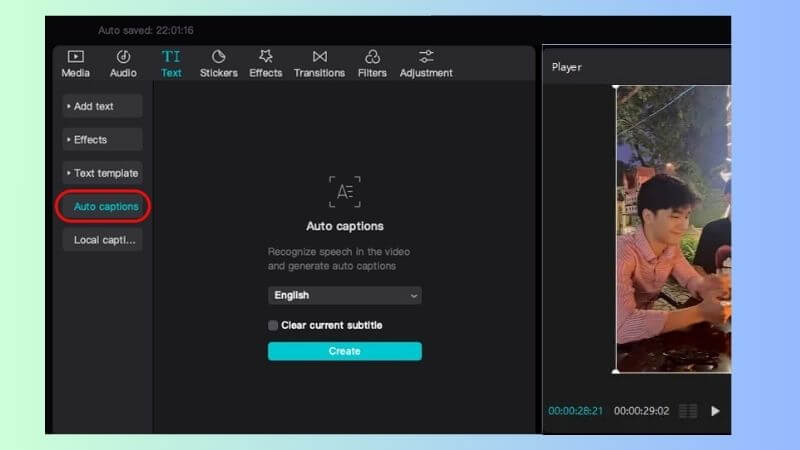
Editing is where your video becomes polished and ready to go viral. CapCut makes this process simple, even for beginners.
- Import files: Upload your voiceover and visuals into CapCut.
- Set aspect ratio (9:16): Adjust your video to 9:16 vertical format—this is essential for TikTok.
- Add auto-captions: Use the Auto Captions feature to generate subtitles. Choose a trending font style and add color highlights to key words.
- Final touches: Add background music, transitions, and export your video in high quality.
TikTok’s AI Rules in 2026: How to Avoid Shadowbans
As AI content becomes more popular, TikTok has tightened its policies to ensure transparency and quality. If you’re creating AI videos, understanding these rules is essential to avoid shadowbans and protect your reach.
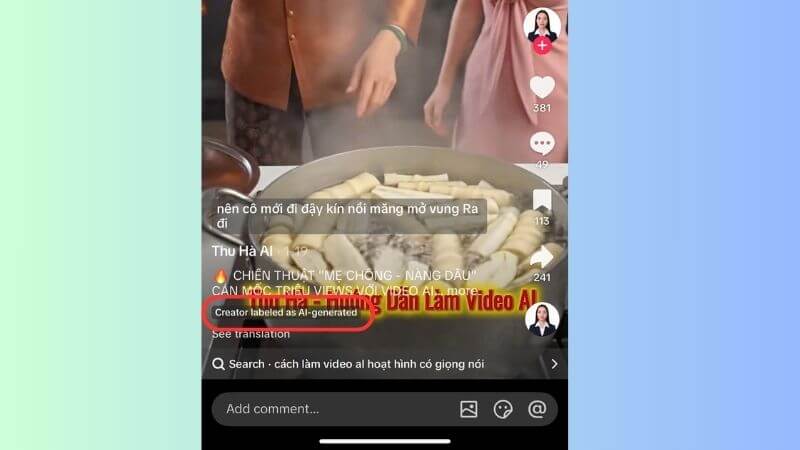
First, always label your content as AI-generated when required. TikTok may limit distribution if your video appears misleading or lacks proper disclosure. Being transparent helps build trust and keeps your content compliant.
Second, focus on originality and value. Reposting identical AI-generated videos or using overused prompts can trigger the “unoriginal content” flag, reducing your visibility. Instead, customize scripts, add unique edits, and bring your own creative angle.
Finally, avoid spammy posting behavior. Uploading too many low-quality videos in a short time can signal automation and harm your account. Stick to a consistent posting schedule with well-edited, engaging content.
Frequently Asked Questions (FAQs)
Can I monetize faceless AI videos on the TikTok Creator Rewards Program?
Yes, but… your content must be original and high-quality. TikTok rewards creative AI videos such as storytelling, educational content, or well-edited clips—not low-effort, mass-produced spam. Focus on value and uniqueness to qualify.
Is there an all-in-one AI tool to make TikTok videos instantly?
Yes. Tools like InVideo AI or Fliki allow you to create videos in one click. However, for better quality and higher viral potential, combining tools like CapCut and ChatGPT in a step-by-step workflow often delivers stronger results.
Why is my AI video getting zero views?
There are two common reasons. First, you may not label your content as AI-generated, which can limit reach. Second, your video might be flagged as unoriginal if many users use the same AI prompts. Try customizing your script and adding unique elements to stand out.
Now you know How to Make AI Videos for TikTok and turn simple ideas into viral content without showing your face or spending hours editing. With the right tools and strategy, anyone can start today. Apply these steps and let AI help you grow faster on TikTok. Follow the 2ui's blog for more tips, tools, and strategies in digital marketing to grow your business online.